

Submitted by Charlton Stanley, Guest Blogger
“I am regularly asked what the average Internet user can do to ensure his security. My first answer is usually ‘Nothing; you’re screwed’.”
– Bruce Schneier
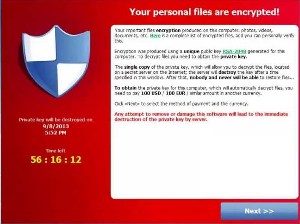
Your personal files are encrypted!
Your important files encryption produced on this computer: photos, videos, documents, etc. Here is a complete list of encrypted files, and you can personally verify this. (it inserts a link to the encrypted files)
Encryption was produced using a unique public key RSA-2048 generated for this computer. To decrypt files you need to obtain the private key.
The single copy of the private key, which will allow you to decrypt the files, located on a secret server on the Internet; the server will destroy the key after a time specified in this window. After that, nobody and never will be able to restore files…
To obtain the private key for this computer, which will automatically decrypt files, you need to pay 300 USD / 300 EUR / similar amount in another currency.
Click <<Next>> to select the method of payment and the currency.
Any attempt to remove or damage this software will lead to the immediate destruction of the private key by server.
RSA is a type of encryption developed by three cryptographers in 1977; Ron Rivest, Adi Shamir and Leonard Adleman. The number following is based on the product of two large prime numbers with an added integer. So far so good, because that is the public key. However, a private key is needed to unlock the encryption, and that can be virtually unbreakable. Adding to the problem of any attempted decryption is the “dead man switch,” which causes the decryption key to destroy itself if any attempt is made to decrypt or lock out the ransomware. Additionally, ransomware usually has a time limit of about 72 hours, and there is a timer counting down showing you how much time you have left to pay the ransom. The countdown clock is on the left side of the warning image. The screengrab above shows fifty-six hours, sixteen minutes and twelve seconds left. When that timer reaches 00:00:00, the decryption key will self-destruct.
The files CryptoLocker infects have the following extensions:
????????.jpe, ????????.jpg, *.3fr, *.accdb, *.ai, *.arw, *.bay, *.cdr, *.cer, *.cr2, *.crt, *.crw, *.dbf, *.dcr, *.der, *.dng, *.doc, *.docm, *.docx, *.dwg, *.dxf, *.dxg, *.eps, *.erf, *.indd, *.kdc, *.mdb, *.mdf, *.mef, *.mrw, *.nef, *.nrw, *.odb, *.odc, *.odm, *.odp, *.ods, *.odt, *.orf, *.p7b, *.p7c, *.p12, *.pdd, *.pef, *.pem, *.pfx, *.ppt, *.pptm, *.pptx, *.psd, *.pst, *.ptx, *.r3d, *.raf, *.raw, *.rtf, *.rw2, *.rwl, *.sr2, *.srf, *.srw, *.wb2, *.wpd, *.wps, *.x3f, *.xlk, *.xls, *.xlsb, *.xlsm, *.xlsx, img_*.jpg
The criminals even anticipated your anti-virus software removing CryptoLocker. You will get a screen instructing you to recover CryptoLocker from your anti-virus software quarantine, or go to an infected site and re-install CryptoLocker. Otherwise, you cannot even pay the ransom and get the private key. Your files are gone permanently. There is now a new twist to the scam, in that if the original decryption subroutine times out and is itself encrypted, for a punitive added fee, they will sell the victim a decryption key that allows access to the now-encoded decryption key. Currently, the going rate is five times the original ransom price.
There is an excellent description of this malware, and some of the ways to deal with it at bleeepingcomputer.com. There is also useful information at the Malwarebytes web site. First of all, look at the information at bleepingcomputer.com and Malwarebytes. Other antivirus companies have similar information and research them as well. Install the software you think will work best for you.
The University of Oxford Medical Sciences Division’s IT department has this advice:
“Make the “file extension” (.docx, .xlsx, .pptx) on users’ documents clearly visible on all Windows machines connected to our network. Recent Windows versions hide this by default – the CryptoLocker infected attachment uses this feature to masquerade as a PDF file, when in fact with the file extension visible, we can see that it actually has a double file extension in the format “.pdf.exe” and is therefore an executable program, which runs when you try to open the file.
Users are advised to be even more vigilant than usual when opening emails – and attachments, particularly if they appear to come from a well-known courier company, even one you or your group/department regularly use.”
It is a good idea to reset your computer so you can see the file extensions for the reasons given in this message from the University of Oxford. Instructions at this link.
CryptoLocker can install itself when a computer is in Safe Mode. That is a new twist as well.

The primary targets seem to be small to medium sized businesses and individuals. A few days ago, the Swansea, Massachusetts Police Department computers were hit, and they had to pay the ransom to preserve their database. That raises an interesting legal question. Any evidence stored in the computer system has now been compromised by a third party having access to it. Can it still be used in court?
All major law enforcement agencies recommend strongly against paying the ransom. Paying a ransom just further enables the thieves, enriching them and making them stronger. That can mean only one thing. In order to keep from having to pay to decrypt your files, you must have copies backed up in a separate location where the ransomware virus cannot get to it to infect it.
This is highly sophisticated software, and the people running these operations are not amateurs. Once the virus is on your computer, it spreads to other computers on your network, and even to your backup files. If it can access remote servers or your cloud storage, it will encrypt those files as well.
There are anti-virus programs being developed that help prevent the virus from spreading or getting on your computer in the first place, but there is no software which will decrypt the files. CryptoLocker is based on high level encryption, so it is unlikely any decryption software will ever be written that can undo the damage. Even if the ransomware Trojan is removed completely from the computer, the files are still encrypted, and are impossible to decrypt—they are gone.
After spending the past week researching this threat to all of us, I have one or two suggestions. My suggestions are based on the fact I have experienced both the “blue screen of death” and actual mechanical hard drive failure. When your hard drive suddenly begins to sound like a fifteen-year-old trying to drive a stick shift for the first time, you know nothing good will come of it. As is often said, “It is not a matter of if, but a matter of when.” If one looks at CryptoLocker as just another form of complete hard drive failure, then the alternative to paying ransom is more obvious. Back in the olden days of DOS, our office computer had a tape backup. It took close to an hour to back up the files, so the tape backup always started an hour before everyone left for the day. At my suggestion, we had two tapes, marked “1” and “2”. The odd number tape was used on odd numbered days, and the even numbered tape on even numbered days. That way, if we had a drive failure, we had the tape from the day before. Or as happened one time, the drive failed and the tape broke the same day. We still only lost two day’s work.
Many people back up constantly, or in some cases, several times a day. One of the things Professor Schneier does to isolate files and computers is keep what he calls an “air gap” between machines. I have not yet upgraded our system, because this new threat is so new. However, this weekend, I plan to buy at least one and possibly two large external hard drives for the main office computer. I have an external hard drive for the home computer, but it is over capacity and I need a new one anyway. They will not be plugged into the computer until it is time do do a backup. I will back up once a day. That way, if the computer becomes infected with CryptoLocker or any other virus–or a hard drive failure–I still have a backup. Experts on ransomware seem to be of a mixed mind with regard to cloud storage. Most cloud storage services claim to have strong virus protection, including protection against ransomware. However, as I said above, these crooks are pros, and Murphy’s Law is still operant.
Frankly, if any of my hard drives becomes infected with ransomware, I will never use it again. I am quite aware of the claims of ransomware being easy to remove, but I am also aware virus writers are busy making removal either difficult or impossible. I will take the hard drive out and destroy it, along with all other installed memory storage. All the top computer security experts are saying that since the current version of CryptoLocker and other ransomware is so profitable, there is no doubt newer, more powerful and more sophisticated versions are being created. The criminals know that every security agency in the world is working on ways to shut them down or destroy the Trojan before it reaches its target. Like every other internet threat, this virus will continue to evolve as long as there is money to be made.

These threats are still evolving, and as fast as anti-virus software is written to protect the user, the criminals are keeping up. The only safe backup is one you manage yourself, offline. That is why I am getting my own external hard drive backup instead of relying on someone else’s servers in the so-called cloud.
I cannot and will not presume to tell anyone the best way to protect yourself. I have thrown out a few resources, and explained what I plan to do with my own system. If one is not an expert, the best plan is to consult with an expert. Additionally, I am not going to try to tell anyone there is a solution if your files are already encrypted by CryptoLocker or other ransomware. I wrote about encryption recently, mentioning TrueCrypt, a powerful asymmetrical encryption program similar to that used by these criminals. Once your files are encrypted, recovering them seems to be a lost cause other than paying a bribe. Personally, it seems more logical to spend the same amount, or less, on good backup hardware. I have provided several links below which should be a good start on making up your own mind on what will work best for you and your situation. These are current and working links at the time I am posting them.
PC Advisor: What you need to know about CryptoLocker and how to protect yourself from this ransomware
Matthew Hughes: CryptoLocker Is The Nastiest Malware Ever & Here’s What You Can Do
Naked Security: Destructive malware “CryptoLocker” on the loose – here’s what to do
CRN’s Robert Westervelt: Cryptolocker Attacks, Ransomware Target Small Businesses: Cisco