Submitted by Charlton Stanley, Guest Blogger
“I am regularly asked what the average Internet user can do to ensure his security. My first answer is usually ‘Nothing; you’re screwed’.”
– Bruce Schneier
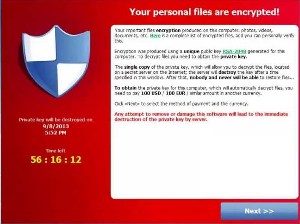 The quote by Professor Bruce Schneier at the top of this article is the unvarnished truth by one of the leading internet and cryptography experts in the world. Which brings us to the subject of this story. The latest threat to everyone’s computer is a form of malware called “Ransomware.” This is not new, having first appeared years ago. Those first attempts were clumsy, the software codes easily broken, and the perpetrators caught. However, in the past few weeks the threat is back, more sophisticated and more dangerous than almost any malware threat to date. Although often referred to as a virus, it is not a true computer virus, because it does not self-propagate. It is a Trojan. Ransomware does not try to steal your files, passwords or photographs. Rather, it holds them hostage until you pay a ransom. There are several ransomware viruses going around, but CryptoLocker is the one getting the most media attention. How it works is this; you click on a file that may have arrived by email. Sometimes it will arrive by clicking on a web page link. Possibly a PDF of some business letter or report. Shortly after clicking an infected link, the image at the left appears. You will have no warning until it is too late. When the warning box appears, your files are already encrypted. Follow me over the flip to see the message:
Your personal files are encrypted!
Your important files encryption produced on this computer: photos, videos, documents, etc. Here is a complete list of encrypted files, and you can personally verify this. (it inserts a link to the encrypted files)
Encryption was produced using a unique public key RSA-2048 generated for this computer. To decrypt files you need to obtain the private key.
The single copy of the private key, which will allow you to decrypt the files, located on a secret server on the Internet; the server will destroy the key after a time specified in this window. After that, nobody and never will be able to restore files…
To obtain the private key for this computer, which will automatically decrypt files, you need to pay 300 USD / 300 EUR / similar amount in another currency.
Click <<Next>> to select the method of payment and the currency.
Any attempt to remove or damage this software will lead to the immediate destruction of the private key by server.
RSA is a type of encryption developed by three cryptographers in 1977; Ron Rivest, Adi Shamir and Leonard Adleman. The number following is based on the product of two large prime numbers with an added integer. So far so good, because that is the public key. However, a private key is needed to unlock the encryption, and that can be virtually unbreakable. Adding to the problem of any attempted decryption is the “dead man switch,” which causes the decryption key to destroy itself if any attempt is made to decrypt or lock out the ransomware. Additionally, ransomware usually has a time limit of about 72 hours, and there is a timer counting down showing you how much time you have left to pay the ransom. The countdown clock is on the left side of the warning image. The screengrab above shows fifty-six hours, sixteen minutes and twelve seconds left. When that timer reaches 00:00:00, the decryption key will self-destruct.
The files CryptoLocker infects have the following extensions:
????????.jpe, ????????.jpg, *.3fr, *.accdb, *.ai, *.arw, *.bay, *.cdr, *.cer, *.cr2, *.crt, *.crw, *.dbf, *.dcr, *.der, *.dng, *.doc, *.docm, *.docx, *.dwg, *.dxf, *.dxg, *.eps, *.erf, *.indd, *.kdc, *.mdb, *.mdf, *.mef, *.mrw, *.nef, *.nrw, *.odb, *.odc, *.odm, *.odp, *.ods, *.odt, *.orf, *.p7b, *.p7c, *.p12, *.pdd, *.pef, *.pem, *.pfx, *.ppt, *.pptm, *.pptx, *.psd, *.pst, *.ptx, *.r3d, *.raf, *.raw, *.rtf, *.rw2, *.rwl, *.sr2, *.srf, *.srw, *.wb2, *.wpd, *.wps, *.x3f, *.xlk, *.xls, *.xlsb, *.xlsm, *.xlsx, img_*.jpg
The criminals even anticipated your anti-virus software removing CryptoLocker. You will get a screen instructing you to recover CryptoLocker from your anti-virus software quarantine, or go to an infected site and re-install CryptoLocker. Otherwise, you cannot even pay the ransom and get the private key. Your files are gone permanently. There is now a new twist to the scam, in that if the original decryption subroutine times out and is itself encrypted, for a punitive added fee, they will sell the victim a decryption key that allows access to the now-encoded decryption key. Currently, the going rate is five times the original ransom price.
There is an excellent description of this malware, and some of the ways to deal with it at bleeepingcomputer.com. There is also useful information at the Malwarebytes web site. First of all, look at the information at bleepingcomputer.com and Malwarebytes. Other antivirus companies have similar information and research them as well. Install the software you think will work best for you.
The University of Oxford Medical Sciences Division’s IT department has this advice:
“Make the “file extension” (.docx, .xlsx, .pptx) on users’ documents clearly visible on all Windows machines connected to our network. Recent Windows versions hide this by default – the CryptoLocker infected attachment uses this feature to masquerade as a PDF file, when in fact with the file extension visible, we can see that it actually has a double file extension in the format “.pdf.exe” and is therefore an executable program, which runs when you try to open the file.
Users are advised to be even more vigilant than usual when opening emails – and attachments, particularly if they appear to come from a well-known courier company, even one you or your group/department regularly use.”
It is a good idea to reset your computer so you can see the file extensions for the reasons given in this message from the University of Oxford. Instructions at this link.
CryptoLocker can install itself when a computer is in Safe Mode. That is a new twist as well.
 When the virus first appeared a few weeks ago, the ransom was in Bitcoins, usually about two Bitcoins. At that time a Bitcoin was worth around a thousand dollars, so the hapless victim had to come up with a couple of grand in less than three days to pay the ransom. The price of Bitcoins has fluctuated recently, so the crew holding your computer hostage has come up with other ways for the victim to pay in more stable currency, although they have not abandoned Bitcoins.
The primary targets seem to be small to medium sized businesses and individuals. A few days ago, the Swansea, Massachusetts Police Department computers were hit, and they had to pay the ransom to preserve their database. That raises an interesting legal question. Any evidence stored in the computer system has now been compromised by a third party having access to it. Can it still be used in court?
All major law enforcement agencies recommend strongly against paying the ransom. Paying a ransom just further enables the thieves, enriching them and making them stronger. That can mean only one thing. In order to keep from having to pay to decrypt your files, you must have copies backed up in a separate location where the ransomware virus cannot get to it to infect it.
This is highly sophisticated software, and the people running these operations are not amateurs. Once the virus is on your computer, it spreads to other computers on your network, and even to your backup files. If it can access remote servers or your cloud storage, it will encrypt those files as well.
There are anti-virus programs being developed that help prevent the virus from spreading or getting on your computer in the first place, but there is no software which will decrypt the files. CryptoLocker is based on high level encryption, so it is unlikely any decryption software will ever be written that can undo the damage. Even if the ransomware Trojan is removed completely from the computer, the files are still encrypted, and are impossible to decrypt—they are gone.
After spending the past week researching this threat to all of us, I have one or two suggestions. My suggestions are based on the fact I have experienced both the “blue screen of death” and actual mechanical hard drive failure. When your hard drive suddenly begins to sound like a fifteen-year-old trying to drive a stick shift for the first time, you know nothing good will come of it. As is often said, “It is not a matter of if, but a matter of when.” If one looks at CryptoLocker as just another form of complete hard drive failure, then the alternative to paying ransom is more obvious. Back in the olden days of DOS, our office computer had a tape backup. It took close to an hour to back up the files, so the tape backup always started an hour before everyone left for the day. At my suggestion, we had two tapes, marked “1” and “2”. The odd number tape was used on odd numbered days, and the even numbered tape on even numbered days. That way, if we had a drive failure, we had the tape from the day before. Or as happened one time, the drive failed and the tape broke the same day. We still only lost two day’s work.
Many people back up constantly, or in some cases, several times a day. One of the things Professor Schneier does to isolate files and computers is keep what he calls an “air gap” between machines. I have not yet upgraded our system, because this new threat is so new. However, this weekend, I plan to buy at least one and possibly two large external hard drives for the main office computer. I have an external hard drive for the home computer, but it is over capacity and I need a new one anyway. They will not be plugged into the computer until it is time do do a backup. I will back up once a day. That way, if the computer becomes infected with CryptoLocker or any other virus–or a hard drive failure–I still have a backup. Experts on ransomware seem to be of a mixed mind with regard to cloud storage. Most cloud storage services claim to have strong virus protection, including protection against ransomware. However, as I said above, these crooks are pros, and Murphy’s Law is still operant.
Frankly, if any of my hard drives becomes infected with ransomware, I will never use it again. I am quite aware of the claims of ransomware being easy to remove, but I am also aware virus writers are busy making removal either difficult or impossible. I will take the hard drive out and destroy it, along with all other installed memory storage. All the top computer security experts are saying that since the current version of CryptoLocker and other ransomware is so profitable, there is no doubt newer, more powerful and more sophisticated versions are being created. The criminals know that every security agency in the world is working on ways to shut them down or destroy the Trojan before it reaches its target. Like every other internet threat, this virus will continue to evolve as long as there is money to be made.
 CryptoLocker is not the only ransomware floating around. There is an FBI virus. That one pops up with an official-looking warning to the effect the FBI has been monitoring your browsing and have determined you are surfing child pornography sites or violating copyright laws. You are further informed your files are encrypted and you can only decrypt them by paying a “fine” of several hundred dollars within a specified time. Some of these warnings include the threat you will be arrested and jailed if you don’t pay they fine they demand. Different scenario, same kind of ransom extortion.
These threats are still evolving, and as fast as anti-virus software is written to protect the user, the criminals are keeping up. The only safe backup is one you manage yourself, offline. That is why I am getting my own external hard drive backup instead of relying on someone else’s servers in the so-called cloud.
I cannot and will not presume to tell anyone the best way to protect yourself. I have thrown out a few resources, and explained what I plan to do with my own system. If one is not an expert, the best plan is to consult with an expert. Additionally, I am not going to try to tell anyone there is a solution if your files are already encrypted by CryptoLocker or other ransomware. I wrote about encryption recently, mentioning TrueCrypt, a powerful asymmetrical encryption program similar to that used by these criminals. Once your files are encrypted, recovering them seems to be a lost cause other than paying a bribe. Personally, it seems more logical to spend the same amount, or less, on good backup hardware. I have provided several links below which should be a good start on making up your own mind on what will work best for you and your situation. These are current and working links at the time I am posting them.
PC Advisor: What you need to know about CryptoLocker and how to protect yourself from this ransomware
Matthew Hughes: CryptoLocker Is The Nastiest Malware Ever & Here’s What You Can Do
Naked Security: Destructive malware “CryptoLocker” on the loose – here’s what to do
CRN’s Robert Westervelt: Cryptolocker Attacks, Ransomware Target Small Businesses: Cisco
I saw this one a few weeks ago. A backup drive that is intermittently connected is good. There are also some system settings that can be changed on PCs to reduce the chance of infection.
http://www.thirdtier.net/2013/10/cryptolocker-prevention-kit-updates/
Unfortunately all security software will always be playing catch up. These attacks will continue because its very hard to trace these attacks back to specific people and they are commonly in countries that are difficult to extradite from.
I suggest a target for them…. The NSA….. And all related agencies….. But, could it be a covert of the CIA doing this to start with….
Thanks chuck for this wonderful information…. Wow….
Hookers For Hackers has been my proposed solution to all of these problems. Get these geeks laid on a regular basis and they won’t be doing this stuff. I’m down for $100.
Since I spend years in computer software development, I’m fully aware of the importance of multiple backups. While I don’t back up my entire system, which results in a big pain when the hard drive gets scrogged (been there, done that), I have multiple backups of the files I cannot recreate or where the re-creation would take a huge amount of time, e.g. genealogy research and family pictures. I also don’t use Internet Express and don’t open unknown emails or attachments. So far, so good.
http://www.huffingtonpost.com/tag/apple-mac-virus/1
Look out, Apple. Eugene Kaspersky is calling you out.
The founder and CEO of Kaspersky Labs spoke with Computer Business Review (CBR) about Apple’s slow progress in security at this week’s Infosecurity 2012 event in London.
“I think they are ten years behind Microsoft in terms of security,” Kaspersky told CBR. “For many years I’ve been saying that from a security point of view there is no big difference between Mac and Windows. It’s always been possible to develop Mac malware, but this one was a bit different. For example it was asking questions about being installed on the system and, using vulnerabilities, it was able to get to the user mode without any alarms
I read an article about this some time back. The author actually wrote the one upside is that once you pay the ransom they give you the key so in that sense they are honest. How sad that living up to their word once you pay the ransom seems like a good thing from them.
Here is a discussion of “virus” in a Linux context (Myth Busting).
Juliet,
I read that Macs are currently resistant to the CryptoLocker virus. However, I would not take chances with that either. This criminal operation is one of the most highly sophisticated we have seen so far. My guess is they just have not gotten around to attacking Macs or Linux…yet.
They seem to be targeting those most likely to pay, which are small and medium size businesses. They have the most to lose, and are less likely to have files backed up. PCs running Windows are the platform of choice for most small businesses. Unlike big corporations with redundant systems and full time IT departments, the smaller business can’t afford a full time IT department, and most of the people barely know how to turn the computer on and off. Like that police department; there was no backup or redundancy, or they would have just thumbed their noses at the crooks instead of paying.
Of course, a lot of people who cannot afford to pay are losing their files too.
This is the NSA’s side gig ;p
A better option is a better operating system in some cases.
When or where that is not an option, the security practices OS mentions are very viable alternatives.
Be careful not to let the “trojan.pdf.exe” or any other malware be copied to the external storage device during the process.
1) disconnect from networks (wired, and/or wireless)
2) disconnect from internet
3) run malware detection software (remove malware if found)
4) connect external drive
5) backup to external drive
6) disconnect external drive
7) reconnect networks and/or internet
Reblogged this on Brittius.com.
I’m just informed that my ex-husband, who is a law professor at a large state university, had a coworker who got this virus on his home computer.
mea culpa: ‘…running Windows to leaving the front door to your house ‘ wide OPEN
I’m so glad we switched to Apple products years ago
Y’all might look into any number of Linux distros: free open source operating system. Another IT guru, Brian Krebs, likened running Windows to leaving the front door to your house. BTW , Linux servers power Amazon, Facebook, Twitter, eBay and Google. As well, ninety-eight percent of supercomputers run Linux . It’s been 8 yrs of FOSS bliss for yrs truly.
– google ‘why linux is better than windows 7’ =About 37,600,000 results
[ NB-windows8 locks the OS, so any mod is verboten ]
cheers
Portable hard drives are so chep now, you are being foolish not to have one..or more. I really like the Toshiba Canvio USB 3.0 series, which doesn’t run unless accessed either by you or your backup software, and shuts down right after operating. Look for 1TB (That’s terabyte, 1000 gigabytes) around $60 or 2TB around $100 on sale.
Three year warranties!
OS,
It’s very late for me here, I probable shouldn’t be posting.
I started this damned PC up , (again, wink,)just to see what special Mike S posted for us & I seen your headline.
I’ll read your post tomorrow but I’ve spent a few hours in my head already own this topic.
I’ll say this, those Fools that are using tools to spy on us are complete lunatics thinking we can’t see them & what they are up to!
Gawd forgive them, because when the rest of We the People see on the dash cams what those terrorist traitor aholes are really up to their own mothers will disown them!!!
I can’t thank some of you guys enough for your efforts OS, Thank You!
Excellent and timely article. Having lost acres of files to HD crashes in the past -and 1 bug that was a true monster – I use external drives to store files and manually back up what I want to keep. I leave them unplugged until I want to put something on them. I did use one of them as a mirror for a new, clean install of my OS after I had set my preferences though. I accumulate so much crap that when my system starts getting fragile I almost look forward to having a newly installed OS.
That is the luxury of having a personal computer and terabytes of kitty .jpg’s though. The methodology for protection you discuss is sound for any scale/kind of system as your list of possible data-saving methods illustrates.
Don’t leave the externals plugged in or updating/saving constantly; backup or transfer stuff you need or want to retain as it is acquired -I plug in a drive and do it 1-2 times a day; Never leave things unbacked up on your computer if you can’t afford to lose them.
I copied the list of suspect file extensions from the link to “bleepingcomputer” you supplied for further reference because I end up with some pretty funky extensions on parts of files. I’ve seen a couple on that list cross my path.
I got a file that was a “jpg . exe” (one of the suspect files in the article) and deleted the . exe and clicked to open the jpg. My computer wouldn’t open it saying it was a format that was not recognised. This was last week and I can only offer that I was not in my right mind when I did it because I know better. (It is also the name of a Trojan that renames your jpg files, all of them.)
I got lucky and nothing happened but deleting it was an itchBay and that kind of extension will have the file deleted immediately upon seeing it in the future. If you get a funky extension open a new tab and google it before you proceed, I always do that (really) except when I don’t like last week. When in doubt, delete. I delete a goodly number of files I end up d/ling without opening them, because they are larger than they should be or some other incongruity I notice. Never wasted a moment regretting it.
Google and the delete button for banishing doubt about an iffy file is as much your friend as your scroll wheel is for maintaining your personal wa on a contentious blawg.
Thanks for the heads up on the latest threat.
Reblogged this on Dianne_thisisme63's Space.
Chuck,
Very informative article. I will be purchasing a hard drive to back up my computer daily as you suggest. Kind of scary to think that hundreds and possibly thousands could be paying this kind of extortion fee. I have already gotten in the habit of running a security scan twice a day, but your idea of a separate hard drive that is disconnected when it is not backing up the laptop is a sensible response to this criminal activity.